Do you want to get more out of your smartphone?
Do you wish you had a smart assistant that can help you with your tasks, research, and creativity?
Here's a Cool Tip. Use the NEW Copilot mobile apps for iOS and Android.
Copilot, formerly called Bing Chat, is an AI-powered chat and content generator that can help you with your tasks, research, and creativity.
You can chat with Copilot, ask it questions, and request it to generate content for you, such as code, poems, stories, essays, and more.
Copilot is available on various platforms, including mobile apps for iOS and Android, Windows, and Microsoft Office tools.
Here's how to Use the Copilot Mobile App
- Download the app from the Apple App Store or the Google Play Store, respectively.
- Sign in with your Microsoft account to access more features and have longer conversations. You can also use the app without signing in, but with some limitations.
- Type in your question or request, or use voice recognition to speak to Copilot.
- Copilot responds in a chat bubble.
- Continue the conversation by typing or speaking more.
- Use the app’s menu to access different modes and settings.
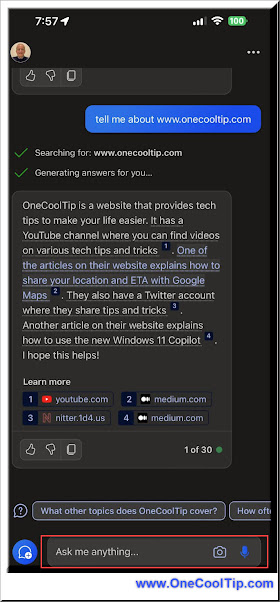 |
fig. 1 Microsoft Copilot iOS mobile app |
Here are some examples of how you can use the Copilot mobile apps for iOS and Android for different purposes and topics:
- Learn to Code - Ask Copilot to write a simple program for you, such as “Write a program that prints Hello World” or “Write a program that calculates the area of a circle”. Copilot generates the code for you in a code block, and you can copy and paste it into your editor or compiler. You can also ask Copilot to explain the code or modify it according to your needs.
- Write a Poem - Ask Copilot to write a poem, such as “Write a poem about winter”.. Copilot generates the poem in a code block. You can copy and paste it into your document. You can also ask Copilot to change the style or tone of the poem, or add more verses or lines.
- Recommend Restaurant - Ask Copilot to recommend a restaurant for you, such as “Recommend a restaurant near me” or “Recommend a restaurant that serves Italian food”. Copilot gives you a list of restaurants that match your criteria, along with their ratings, reviews, and locations.
What do you think of Copilot?
Let us know in the comments below.
Enjoy!
READ MORE
OneCoolTip.com
Cool Tech Tips for a Cooler Life!
#Microsoft @Microsoft #Copilot #CopilotApp #CopilotChat #iOS #Android #AI #TechTips #OneCoolTip @OneCoolTip


