Showing posts with label Microsoft Teams. Show all posts

Wednesday, June 24, 2026

Turn Copilot Into Your Personal Quiz Builder in Minutes

Turn Copilot Into Your Personal Quiz Builder in Minutes

Need to create a quiz quickly without starting from scratch? Microsoft Copilot can generate complete quizzes with answer keys in seconds, saving time and effort.
 
By Rodger Mansfield, Technology Editor
June 24, 2026


Microsoft Copilot
You need to create a quiz. 

Maybe it is for a training session, a classroom lesson, or a quick way to test your own knowledge. 

The problem is that writing good questions takes time, and staring at a blank page rarely helps.

Here’s a Cool Tip: Generate Complete Quizzes Instantly with Copilot.

With a simple prompt, Copilot can generate a complete quiz, including questions and answer keys, in seconds.

This is more than a time-saver. It can change how you prepare lessons, onboard employees, or study for exams.

Copilot Quizes

Sunday, April 13, 2025

Skype’s Farewell: What You Need to Know and How to Transition Seamlessly

Skype’s Farewell: What You Need to Know and How to Transition Seamlessly

Skype is retiring in May 2025, marking the end of an era for one of the most iconic communication tools. Learn how to transition to Microsoft Teams Free and ensure uninterrupted connectivity.

By Rodger Mansfield, Technology Editor 
April 13, 2025


Skype icon
What happens when a beloved communication tool bids farewell? 

Skype, once synonymous with video calls and instant messaging, is retiring on May 5, 2025. 

As users prepare to say goodbye, the question arises: What’s next? 

Here's a Cool Tip:  Switch to Microsoft Teams.

Microsoft Teams Free emerges as the successor, promising enhanced features and seamless integration.

Let’s explore how you can make the transition without missing a beat.

Monday, February 5, 2024

Unleash Productivity with This Cool Keyboard Shortcut in Microsoft Teams

Are you getting the most out of Microsoft Teams? 

Have you ever wondered if there’s a quicker way to access your settings and keyboard shortcuts?

In today’s fast-paced work environment, efficiency is key. 

Here's a Cool Tip.  Use the Control + . (period) keyboard shortcut.

This shortcut brings up a helpful screen of keyboard shortcut commands in Teams.

Microsoft Teams is a versatile platform that serves as a hub for teamwork within the Microsoft 365 ecosystem. 

It facilitates collaboration, communication, and productivity by integrating chat, video meetings, file storage, and application integration.

Microsoft Teams has become an indispensable tool for collaboration and communication, and knowing the ins and outs can significantly boost your productivity. 

And this keyboard shortcut is your secret productivity tip.


Here's how to do it.
  1. Open Microsoft Teams.
  2. Ensure you’re logged into your account.
  3. Press Control + . (period) on your keyboard.
  4. A window displays all the keyboard shortcuts available in Microsoft Teams.
Instantly view all shortcuts without navigating through menus.
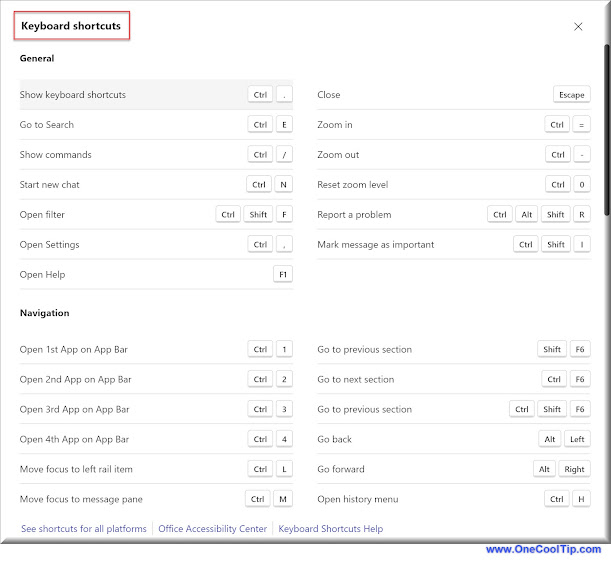
Microsoft Teams - Keyboard Shortcuts
fig. 1 - Microsoft Teams - Keyboard Shortcuts


This saves time, allowing you to work more efficiently and it's simple and easy to remember.

And here's another Cool Keyboard Shortcut in Microsoft Teams:  Control + , (Comma).

This displays the settings screen.

Mastering the Control + . and Control + , shortcuts in Microsoft Teams are small steps with a big impact on your daily productivity. 

These are simple tricks that can lead to a more efficient and streamlined workflow.

Enjoy!


Please LIKE and SHARE OneCoolTip.com!
Visit the OneCoolTip YouTube Channelhttps://www.youtube.com/@onecooltip


READ MORE


OneCoolTip.com
Cool Tech Tips for a Cooler Life!

#Microsoft @Microsoft #Teams @MIcrosoftTeams #MicrosoftTeams #ProductivityHacks #WorkplaceEfficiency #TechTips #TechTips #OneCoolTip @OneCoolTip